Advance Usage
some_style
For the arguments ended with ‘style’, you can give a dict, which can be used to control text’s style.
For example, rownames_style can change the style of row’s names.
First, we create a DataFrame represent a gene expresion matrix.
mat = pd.DataFrame(
    np.random.randint(0, 30, 20).reshape(5, 4),
    index=["ERBB2", "ERBB4", "EZH2", "FGFR2", "FGFR3"]
)
The default heatmap of the above DataFrame is as follow:
fig = pheatmap(mat=mat, show_colnames=False)

Now, we can change fontsize to 10pt(default: 6pt), fontstyle to “italic”(default: normal) and left align.
Note: left align, the rownames will be overlap with heatmap, therefore, need to adjust rownames to left by
position
fig = pheatmap(
    mat=mat, show_colnames=False,
    rownames_style={"fontsize": 10, "fontstyle": "italic", "ha": "left", "position": (-0.1, 0)}
)

Legend
For legend, you can adjust every legend by point the legend’s name as keys to legend_*. For example, we can
normalize the genes’ expression to [0, 1] by max-min normalize.
mat = (mat - mat.min()) / mat.max()
fig = pheatmap(
    mat=mat, show_colnames=False,
    rownames_style={"fontsize": 10, "fontstyle": "italic", "ha": "left", "position": (-0.1, 0)},
)
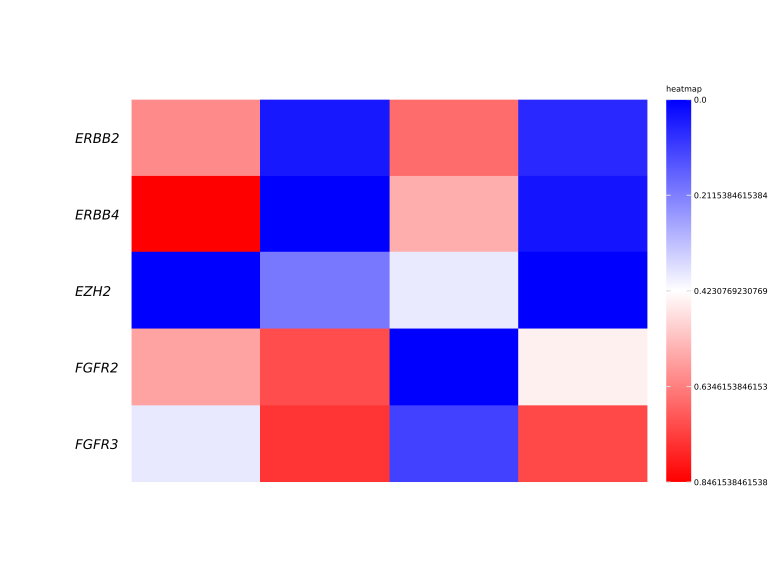
But the legend’s labels are not beautiful, you can modify it by youself.
fig = pheatmap(
    mat=mat, show_colnames=False,
    rownames_style={"fontsize": 10, "fontstyle": "italic", "ha": "left", "position": (-0.1, 0)},
    legend_tick_locs={"heatmap": np.arange(0, 1, 0.2)},
    legend_tick_labels={"heatmap": [f"{i:.3f}" for i in np.arange(0, 1, 0.2)]}
)

You can also change label style for legend tick labels, such as: fontsize, rotation, fontstyle, etc.
fig = pheatmap(
    mat=mat, show_colnames=False,
    rownames_style={"fontsize": 10, "fontstyle": "italic", "ha": "left", "position": (-0.1, 0)},
    legend_tick_locs={"heatmap": np.arange(0, 1.2, 0.2)},
    legend_tick_labels={"heatmap": [f"{i:.3f}" for i in np.arange(0, 1.2, 0.2)]},
    legend_tick_labels_styles={"fontsize": 8, "color": "gray"}
)

Annotation Advance
Annotations can be continuous or discrete for rows or columns. If the annotation is discrete, you can specify the order of the categories. For example, we want to visualize some gene expression dynamic along with the embryo development.
mat = pd.DataFrame(
    np.hstack([np.random.randint(0, 15, 20 * 10).reshape(20, 10),
              np.random.randint(5, 20, 20 * 20).reshape(20, 20),
              np.random.randint(10, 25, 20 * 30).reshape(20, 30)]),
    index=[f"G{i}" for i in np.arange(20)]
)
anno_col = pd.DataFrame({
    "embryo-developing": np.hstack([np.repeat(["Morula"], 10), np.repeat(["Blastula"], 20), np.repeat(["ESC"], 30)])
})
fig = pheatmap(
    mat, cmap="Reds",
    annotation_col=anno_col,
    annotation_col_cmaps={"embryo-developing": "Set1"},
    show_colnames=False
)

The legend’s of embryo-developing annotation is not right order of embryo development. You can specify the order by the follow method:
anno_col["embryo-developing_right_order"] = anno_col["embryo-developing"].astype(
    pd.CategoricalDtype(["Morula", "Blastula", "ESC"]))
fig = pheatmap(
    mat, cmap="Reds", annotation_col=anno_col,
    annotation_col_cmaps={"embryo-developing_right_order": "Set2", "embryo-developing": "Set1"},
    show_colnames=False, legend_bar_space=2.5
)

More information to see pheatmap API.